There is no single "DoDMERB portal." If your student has been directed to log in and check their status, you are about to use two separate systems with two different purposes, two different login processes, and no shared credentials. Confusing them is the most common mistake families make.
In August 2025, DoDMERB completed a system modernization that replaced the old dodmerb.tricare.osd.mil applicant site with DMACS 2.0. If you are searching for "DoDMERB portal login" and landing on unfamiliar pages, this is why.
DMACS 2.0 is where your student completes the medical history questionnaire, checks their qualification status, and uploads documents when requested. DoDMETS is the contractor scheduling system where exam appointments get booked. You use both, in sequence, and never interchangeably.
This guide walks through each system in the order you will use them.
Key Takeaways
- The current DoDMERB applicant portal is DMACS 2.0, accessed at ready2serve.dmacs.health.mil — not the old tricare.osd.mil address
- DMACS 2.0 handles medical history, qualification status, and document uploads; DoDMETS handles exam scheduling only
- You cannot self-register for DMACS. Your account activates only after DoDMERB sends a registration email, and you have 90 days to complete it
- DoDMETS credentials come from a CIV Team packet; you cannot create your own DoDMETS account
- Normal wait time from exam completion to qualification determination is 6 to 8 weeks
- For login or password help, email dha.ncr.dod-merb.mbx.webmaster@health.mil
Step 1: Understand the Two DoDMERB Systems Before You Log In
Most DoDMERB login confusion happens because families treat two completely separate systems as one. They are not. Knowing what each system does before you try to log in prevents the most common mistakes.
DMACS 2.0: Your Medical History and Status System
DMACS 2.0 (Defense Medical Accessions Computing System) is the official DoD applicant portal managed by DoDMERB. Log in at ready2serve.dmacs.health.mil. This is where your student:
- Completes the online medical history questionnaire
- Prints DD Form 2807 and DD Form 2808 for the exam appointment
- Checks their qualification status (Qualified, Remedial, or Disqualified)
- Reads remedial requests from their case manager
- Uploads requested medical documentation
Your DMACS account is created using a registration email from DoDMERB. You do not register on the site itself.
DoDMETS: Your Exam Scheduling System
DoDMETS (dodmets.com) is the contractor scheduling system managed by CIV Team Inc., the Philadelphia-based company that coordinates DoDMERB's contracted medical exams. Log in at dodmets.com/LoginApplicant. This is where your student:
- Sees which contracted medical and optometry facilities are assigned to them
- Schedules the physical exam appointment
- Schedules the eye exam appointment (may be a different facility)
DoDMETS credentials come from a packet CIV Team sends after your student completes the DMACS questionnaire. You cannot create a DoDMETS account on your own.
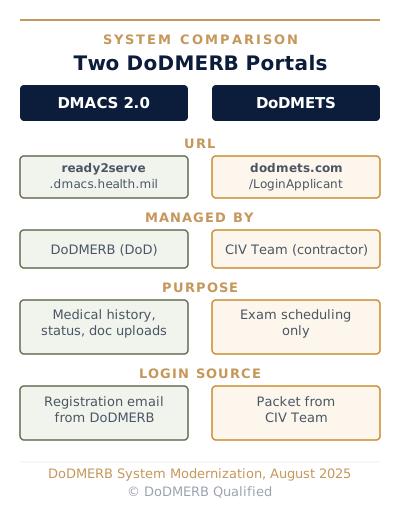
Here is how the two systems compare:
| DMACS 2.0 | DoDMETS | |
|---|---|---|
| URL | ready2serve.dmacs.health.mil | dodmets.com |
| Managed by | DoDMERB (DoD) | CIV Team (contractor) |
| Purpose | Medical history, status, document uploads | Exam scheduling only |
| Login source | Registration email from DoDMERB | CIV Team packet |
| What to do there | Complete questionnaire, check status, upload Remedial docs | Schedule physical and eye exam appointments |
Related: For a detailed walkthrough of what happens at each exam, see DoDMERB Exam: What to Expect.
After this step, you know which portal handles each task and what credentials to expect for each.
Step 2: DMACS Account Creation — Activate Your DoDMERB Profile
You cannot create a DMACS account by navigating to ready2serve.dmacs.health.mil and clicking a sign-up button. The account only activates when DoDMERB sends a registration email, triggered when your commissioning program (the service academy, ROTC detachment, or other program) initiates your DoDMERB case.
Once you receive the registration email, you have 90 days to complete account creation. If that window expires, contact the DoDMERB helpdesk at dha.ncr.dod-merb.mbx.helpdesk@health.mil.
How to Create Your DMACS Account
- Check your email inbox and spam folder for a registration email from DoDMERB.
- Click the link in the email. It routes you to ready2serve.dmacs.health.mil.
- Complete authentication through dmacsauth.csd.disa.mil using a one-time passcode (OTP) sent to your email.
- On your first login, click "Forgot Password" to set your permanent password.
- Complete the profile setup and proceed to the medical history questionnaire.
After this step, you are logged into DMACS 2.0 and can proceed to the medical history questionnaire.
Step 3: Medical History Questionnaire — Complete It in DMACS Before Your Exam
The medical history questionnaire covers your student's health from birth to today, and most applicants do not know their own childhood records as well as their parents do. DoDMERB recommends completing it with a parent present.
The questionnaire includes more than 100 yes/no questions covering conditions, surgeries, medications, mental health history, injuries, allergies, hospitalizations, and vision and hearing history. Every "Yes" answer requires a written explanation, including conditions that resolved years ago.
Why Accuracy Here Matters
Thorough answers at this stage prevent Remedial requests later. When a case manager reviews the completed questionnaire, unexplained "Yes" answers generate follow-up requests for documentation. A condition clearly explained in the questionnaire is less likely to trigger a request for additional records.
Complete honesty on the questionnaire reflects the integrity standard expected of future officers. Inaccurate or incomplete answers can jeopardize a candidate's commissioning pathway.
After submitting the questionnaire, print DD Form 2807 and DD Form 2808 from DMACS. Both must be printed single-sided.
After this step, the questionnaire is submitted and both DD Forms are printed and ready for exam day.
Step 4: Exam Scheduling — Use DoDMETS After CIV Team Contacts You
You do not log into DoDMETS on your own timetable. CIV Team contacts you. After your student submits the DMACS questionnaire, CIV Team initiates contact via email or phone. They may try up to four times over 45 days.
When CIV Team reaches out, they provide login credentials for DoDMETS. Use those credentials at dodmets.com/LoginApplicant to see which contracted facilities are assigned to your student.
Scheduling Your Appointments
Schedule both appointments as soon as credentials arrive. Scheduling can take up to 30 days, and delays compound against academy application deadlines.
Two separate appointments are required: a physical exam and an eye exam. The facilities may be at different locations. Exams at contracted providers are covered by DoDMERB at no cost to your student.
Take the first available appointment, even if it is not the most convenient date. A later slot does not move your case forward faster.
Once your appointments are confirmed, treat them as fixed commitments. The scheduling system enforces strict attendance rules.
After this step, both exam appointments are confirmed on your calendar.
DoDMERB Qualified
Not sure how to navigate DoDMERB's two-system process for your student's specific situation?
We walk through the DMACS and DoDMETS workflow with you, help you complete the questionnaire accurately, and flag anything that needs attention before the exam.
Step 5: Monitor Your Case After the Exam — What Normal Looks Like
After your student's exams, expect a wait measured in weeks, not days. That silence is not a bad sign. It is the normal pipeline.
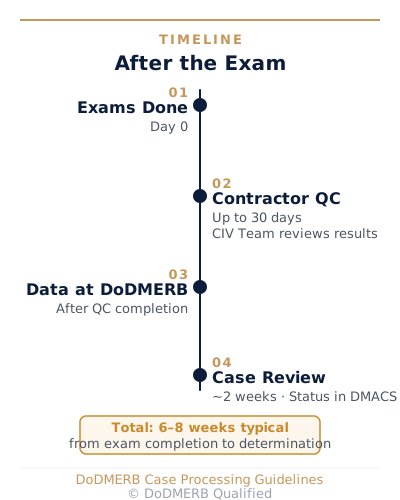
After exam completion, the contracted facility has up to 30 days to complete quality review and deliver results to DoDMERB. Once DoDMERB receives the data, a case manager reviews the file and enters a determination. That review takes approximately two weeks.
The timeline from exam completion to determination: typically six to eight weeks. From initial case trigger to final decision: two to four months.
Here is the milestone breakdown:
| Milestone | Timeframe | Who Is Responsible |
|---|---|---|
| Exam appointments completed | Day 0 | Applicant |
| Contractor quality review | Up to 30 days | CIV Team |
| Data delivered to DoDMERB | After QC completion | CIV Team |
| Case manager review | ~2 weeks after delivery | DoDMERB |
| Status update in DMACS | After review | DoDMERB |
Log into DMACS at ready2serve.dmacs.health.mil to monitor status. Your qualification determination appears on the DMACS homepage when it is entered. Check the "Additional Actions Required" card for any Remedial requests.
If no status change appears within five to seven business days after an expected milestone, email your assigned case manager or the DoDMERB helpdesk at dha.ncr.dod-merb.mbx.helpdesk@health.mil.
After this step, you know the normal wait timeline and have the helpdesk contact for follow-up.
Step 6: Respond to a Remedial Request — Upload Documents in DMACS
Remedial does not mean disqualified. It means DoDMERB needs more information before making a determination. Remedial requests are common and typically resolve with straightforward documentation.
When your case is in Remedial status, the "Additional Actions Required" card appears on your DMACS homepage.
How to Find and Respond to the Request
- Log into DMACS at ready2serve.dmacs.health.mil.
- On the homepage, find the "Additional Actions Required" card.
- Click "Additional Actions" to see the specific request code and what documentation is needed.
- Gather all requested documents before uploading.
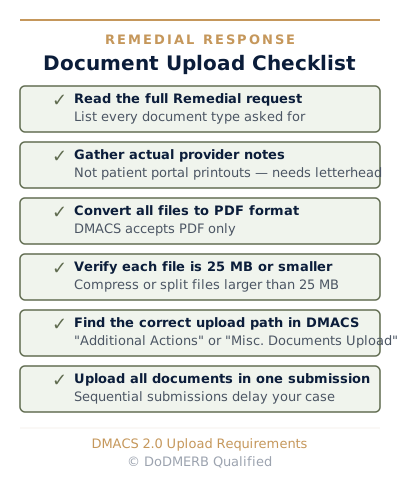
- Upload documents as PDFs. Maximum file size is 15MB per file. Compress or split files larger than 15MB before uploading.
- If the specific request code does not permit a direct upload, click "More" on the homepage, then "Miscellaneous Documents Upload."
One Submission, Not Several
Submit all requested documents at once. Sequential partial submissions generate sequential follow-up requests from your case manager. Submitting everything in a single batch moves your case forward faster.
Obtain actual clinical records from the provider's office, not website or portal summaries. Do not submit patient-portal printouts unless the remedial request expressly allows them.
If hard copies must be mailed, the address is: DoDMERB, 8034 Edgerton Drive, Suite 132, USAFA, CO 80840.
Remedial Response Checklist
After this step, all requested Remedial documents are submitted and your case is back in DoDMERB's queue.
Step 7: Read Your Final Determination — Qualified, Remedial, or Disqualified
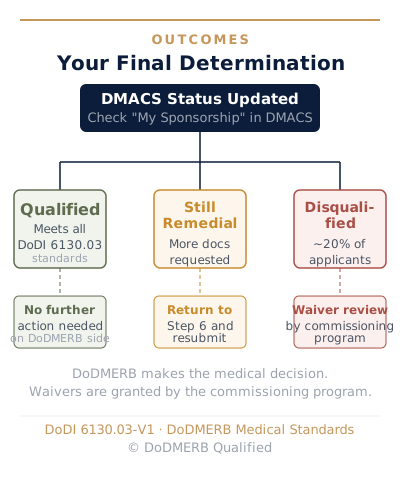
About 20% of DoDMERB applicants receive a Disqualification. A DQ is not the end of your student's commissioning pathway. Understanding what each outcome means and what comes next determines whether your family moves forward or stops.
Your final determination appears on the DMACS homepage after your case manager enters it. Three outcomes are possible.
Qualified
Your student meets all medical standards under DoDI 6130.03. They are cleared to proceed with the commissioning process. No further action is needed on the DoDMERB side.
Disqualified
One or more conditions do not meet DoDI 6130.03 standards. DoDMERB issues a Disqualification code for each condition. The commissioning program (your ROTC detachment, service academy, or other program) then decides whether to submit your student's case for waiver review.
DoDMERB does not grant waivers. The waiver decision belongs entirely to the commissioning program's waiver authority. Check "My Sponsorship" in DMACS to find your waiver authority contact information.
Army and Navy ROTC applicants receive automatic waiver consideration. Four-year and three-year Air Force ROTC scholarship recipients are also automatically considered. Service academy waiver processes vary by program.
Still Remedial
If you receive additional Remedial requests after your first submission, return to Step 6 and repeat the document upload process. Remedial cases sometimes cycle through multiple rounds before a determination is issued, particularly for complex medical histories.
Related: For a complete breakdown of the waiver process by service, see the DoDMERB Waiver Process: Complete Guide.
After this step, you understand your student's determination and know the next action regardless of outcome.
Frequently Asked Questions
Where do I log in to check my DoDMERB status?
Log in at ready2serve.dmacs.health.mil. This is DMACS 2.0, the DoDMERB applicant portal that replaced the old dodmerb.tricare.osd.mil site in August 2025. The old URL may still appear in search results but is no longer the applicant portal.
Why can't I log into DoDMETS or create an account?
DoDMETS credentials are issued by CIV Team, not self-created. You receive them in a packet after completing the DMACS medical history questionnaire. If you have submitted the questionnaire and have not heard from CIV Team within 45 days, call (215) 587-9600.
My DMACS status hasn't changed in two weeks. Is something wrong?
Probably not. The contracted facility has up to 30 days to complete quality review after the exam. DoDMERB case managers then take approximately two weeks to process the determination. A total wait of six to eight weeks from exam completion is normal. If you have passed an expected milestone without a status update, email dha.ncr.dod-merb.mbx.helpdesk@health.mil.
What do I do when I see "Remedial" in DMACS?
Check the "Additional Actions Required" card on your DMACS homepage, then click "Additional Actions" to see the specific request. Upload all requested documents as PDFs (max 15MB each) in one batch. See Step 6 above for the full upload process.
What is the difference between DMACS and DoDMETS?
DMACS 2.0 (ready2serve.dmacs.health.mil) is the official DoDMERB portal for medical history, status tracking, and document uploads. DoDMETS (dodmets.com) is the contractor scheduling system used only for booking physical and eye exam appointments. They have separate logins and serve different purposes. See Step 1 for the full comparison.
I don't see my assigned clinic in DMACS. What do I do?
This is a known issue with the DMACS 2.0 system. Check your email inbox and spam folder for a separate message from DoDMERB with DoDMETS scheduling instructions. This email typically arrives within one to three weeks of questionnaire submission. Call CIV Team at (215) 587-9600 if you have not received it after three weeks.
Does a DQ from DoDMERB mean my student cannot get into ROTC or a service academy?
Not necessarily. About 20% of DoDMERB applicants receive a Disqualification, and many of those receive waivers from their commissioning program. DoDMERB makes the medical determination; the commissioning program decides on the waiver. See Step 7 above, and see the DoDMERB Waiver Process guide for service-by-service details.
The appearance of U.S. Department of Defense (DoD) visual information does not imply or constitute DoD endorsement.